
Instead of manually copying every Guesty departure into a cleaning calendar, build a departure-based workflow that assigns a turnover, carries the property instructions, and flags reservation changes. A Guesty cleaning schedule integration needs both a scheduling connection and a cleaner’s acceptance; a calendar entry alone does not confirm coverage.
- Build your Guesty cleaning schedule integration around departures, cleaner acceptance, and completion checks.
- Use Guesty task automation only after confirming the feature and permissions in your account.
- Tampatopshelf provides local vacation-rental cleaning for St. Petersburg and Pinellas County hosts.
- Test changed dates and cancellations before relying on an automated turnover schedule.
For local help, Tampatopshelf provides vacation-rental turnover cleaning with a St. Petersburg team reachable by phone or text. Tampatopshelf vacation-rental cleaning is best for St. Petersburg and Pinellas County hosts seeking local turnover coverage and direct communication. Scheduling software organizes the work; your cleaning agreement defines who performs it and how coverage is confirmed.
Why this matters
A reservation calendar answers when guests occupy a property. A cleaning schedule must also answer who cleans, when access begins, what the assignment includes, and who checks completion.
For your 2026 setup, keep those responsibilities separate. A booking update should reach the cleaning workflow, but it should not silently become a promise that a cleaner has accepted a changed appointment.
The practical goal is 1 active turnover assignment per departure, with a clear process for exceptions. Duplicate assignments, outdated checkout times, and unconfirmed changes undermine that goal even when the original connection works.
Before you start
- Confirm Guesty access and features. Have permission to view reservations and manage the task or integration settings you intend to use. Guesty account configurations differ; establish which task-automation or connected-service features your account actually includes before choosing a route.
- Prepare property instructions and cleaning coverage. Gather the property identifier, access procedure, departure and arrival times, turnover checklist, linen arrangements, and the person responsible for accepting work. Share access details through an agreed secure channel rather than a broadly shared calendar.
- Resolve the change-handling gotcha first. A connection that creates an assignment does not, by itself, establish what happens after a date change or cancellation. Agree on who checks updates, who removes obsolete work, and how a cleaner accepts a revised window.
Do not assume a cleaning company receives Guesty reservations automatically. Confirm the actual communication method with the team handling your property. This guide does not establish a direct Guesty connection for Tampatopshelf.
Choose your scheduling route
Choose the route your account and cleaning team can support, not the one with the longest feature list. Both approaches below still need an owner for changes and exceptions.
| Scheduling route | Best for | Main advantage | Main limitation |
|---|---|---|---|
| Guesty task automation, when enabled | Hosts whose cleaning team can work within the available Guesty task process | Keeps the reservation and associated work within the same operational system | Requires suitable account features, permissions, and a confirmed assignment process |
| Host-managed cleaning schedule | Hosts coordinating directly with a local cleaning team | Makes acceptance and property-specific instructions explicit | Requires the host or manager to transfer and reconcile reservation changes |
A host-managed schedule is not a live software integration. It is a workable coordination process when you cannot verify an automated connection.
For a 2026 workflow, write down the chosen route and its limitations. If you add an external scheduling service later, verify its supported Guesty connection, permissions, and update behavior before replacing the existing process.
Reservation trigger configuration
The first configuration unit establishes which reservation event produces cleaning work. Guesty interface labels and navigation depend on the account configuration, so use the task-automation controls available in your account rather than assuming a universal button sequence.
- Open the Guesty account that manages the property. Identify the reservation record and confirm that its property identifier matches the cleaning instructions.
- Locate the available task-management and automation settings. If your account does not provide a suitable departure-based rule, use the host-managed route instead of trying to substitute an unrelated notification.
- Select a departure-based event where supported. The cleaning assignment should relate to the guest leaving, not simply to the date a reservation was created.
- Limit the rule to the intended properties. Start with a controlled property scope before applying the same instructions across different homes.
- Define the assignment identity using the property and reservation reference. Keep enough information to distinguish a revised assignment from a second departure.
- Save the configuration using the controls shown in your account. Inspect the resulting task or assignment before treating the rule as active coverage.
Expected result: A qualifying departure produces an identifiable cleaning assignment for the correct property. A reservation notification without an associated work assignment does not meet this test.
For the host-managed route, record the departure in your cleaning schedule and send the assignment through the agreed communication channel. Mark coverage as unconfirmed until the cleaner accepts it.
Cleaning window and checklist configuration
A departure date is not a complete appointment. Define the access window and the expected work before assigning the cleaner.
- Record the departing guest’s checkout time and the next guest’s arrival time, when applicable. Confirm the property’s local time zone wherever the workflow displays appointment times.
- Set the cleaning window within the period when the property is accessible. Do not treat the entire gap between bookings as the cleaner’s agreed working time.
- Attach or reference the property’s turnover checklist. Separate routine cleaning from inspection requests, restocking instructions, and maintenance reporting.
- Identify who supplies linens and consumables. Specify where clean items belong and how shortages should be reported without assuming replenishment is included in the cleaning scope.
- Define what completion means. A completed cleaning assignment should not automatically stand for a resolved maintenance issue or a separate property inspection.
Expected result: The assignment tells the cleaner where to go, when access is authorized, what work is expected, and how to report completion.
Use an Airbnb turnover cleaning checklist to structure the work, then adapt it to the actual property. For St. Petersburg and Pinellas County rentals, identify sand-prone entrances and outdoor areas that belong in the agreed cleaning scope rather than leaving them implicit.
Keep your 2026 checklist separate from reservation-specific notes. Permanent instructions belong in the property record; a temporary access change belongs with the affected assignment.
Assignment and confirmation configuration
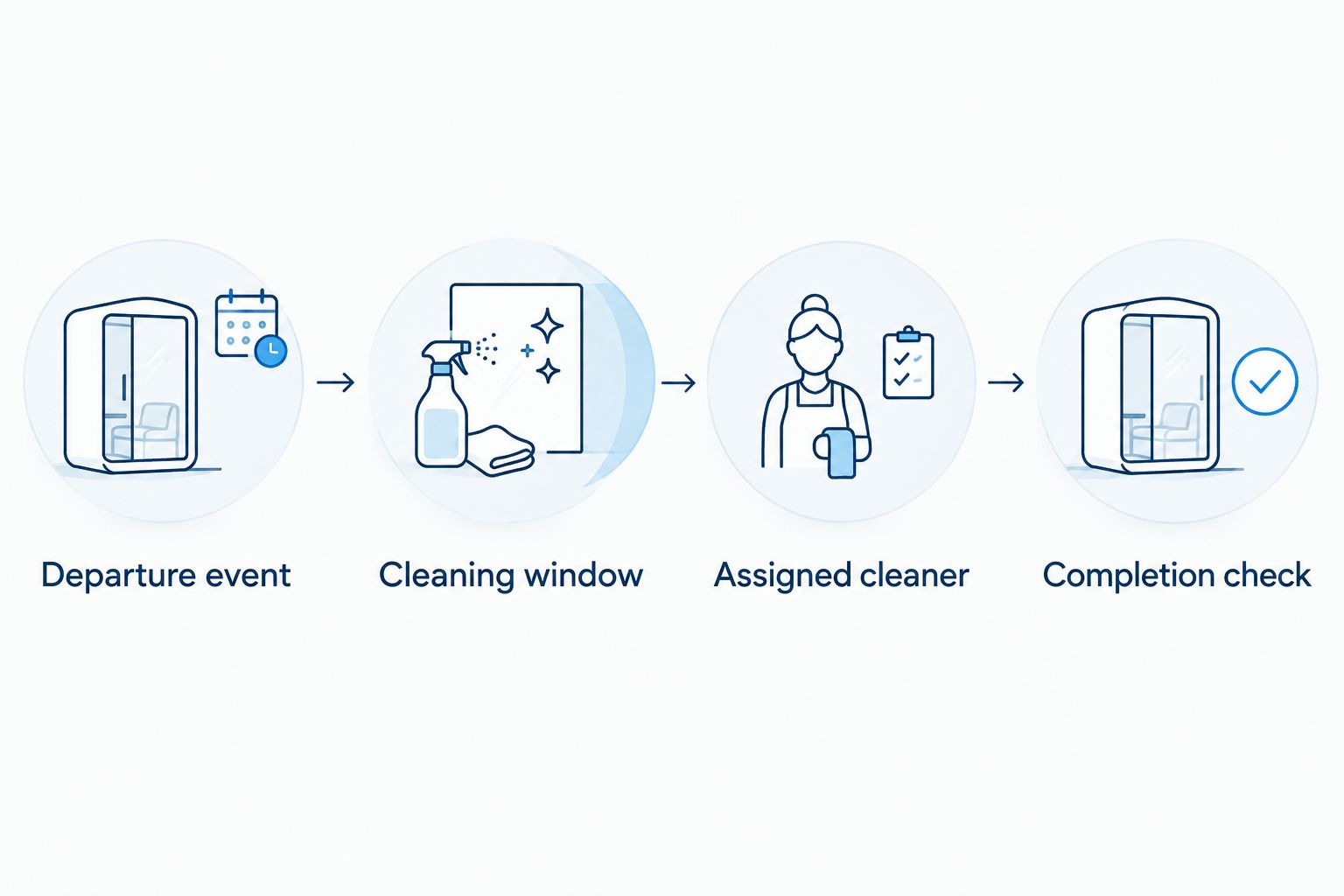
The next configuration unit connects a scheduled departure to an accountable person. Use these checkpoints in order:
- Departure event: Confirm that the reservation actually requires a turnover. Identify any cancellation, extension, or owner-use change before issuing work.
- Cleaning window: Send the agreed access window with the assignment. Include any restriction that changes when cleaning can begin.
- Assigned cleaner: Identify the person or team responsible and obtain acceptance through the agreed channel. An automated message being sent is not evidence of acceptance.
- Completion check: Define who receives the completion update and who resolves unfinished work or reported problems.
Expected result: You can distinguish an assignment that exists, an assignment someone has accepted, and work reported complete. Those are different operational states, even when your software uses different wording.
Tampatopshelf offers dependable turnover coverage with straightforward quotes tailored to each property. Agree on the scheduling and confirmation process directly; do not infer acceptance from a calendar entry or assume a particular software connection is included.
Validation and change-handling configuration
Test the workflow before relying on it for an occupied property. Use a safe test method supported by your account, and do not alter a real guest reservation merely to test cleaning automation.
- Prepare 2 test scenarios: an ordinary departure and a departure followed by another arrival. Verify the property, access window, instructions, and recipient in each case.
- Check assignment acceptance. Confirm that the host or manager can identify unaccepted work without reading every message thread.
- Test a departure-date change using the supported test method. Inspect whether the original assignment changes, remains unchanged, or requires manual correction.
- Test a cancellation. Confirm who removes or closes obsolete work and who tells the cleaner that the appointment has changed.
- Run 3 final checks: the assignment matches the reservation, the cleaner has accepted the current window, and the completion-reporting path is clear.
Expected result: You know the workflow’s actual behavior for creation, changes, and cancellation. Document any manual correction required instead of assuming the connection handles it.
Record the results with your 2026 operating instructions. Repeat the relevant checks after changing the scheduling route, permissions, or assignment rules.
Update cleaning whenever a reservation changes
A second workflow handles revisions after the original turnover has been assigned. Keep this separate from the new-departure workflow so a changed reservation does not become duplicate work.
When a guest extends a stay, move the cleaning request to the revised departure window and obtain fresh acceptance. The original appointment remains a responsibility to resolve, not an item to leave behind in the calendar.
When an arrival changes, review whether the accepted cleaning window still works. A shorter gap between guests requires a direct coverage check; changing the calendar does not change the cleaning team’s commitments.
Use this revision sequence:
- Identify the existing assignment using the property and reservation reference.
- Compare the previous departure and arrival details with the revised reservation.
- Update the assignment through the supported process, or correct it manually.
- Tell the assigned cleaner what changed and request confirmation of the new window.
- Remove the obsolete appointment only after verifying that the current assignment is clear.
Expected result: The schedule shows the current job without leaving an earlier appointment active. If your connection cannot update assignments, keep a documented manual revision process.
Troubleshooting
A departure appears, but no cleaning assignment exists
Check whether the workflow creates work or only sends a notification. Then inspect property scope, event conditions, permissions, and whether the rule was active for that reservation. Create a manual assignment while correcting the configuration so the departure is not left uncovered.
The cleaner receives duplicate assignments
Look for overlapping automation rules or a manual assignment added alongside an automated task. Compare the reservation reference before deleting anything. Keep the accepted assignment, resolve the duplicate, and tell the cleaner which record is current.
The date changed, but the cleaning appointment did not
Check the connection’s documented update behavior and inspect the actual assignment. Correct the appointment, obtain acceptance for the revised window, and add a manual change check if automatic updates are not supported.
The cleaner cannot see instructions or access details
Check recipient permissions and where the instructions were stored. Share only the information needed for the job through the agreed channel; do not solve an access problem by distributing unrestricted account credentials.
Cleaning is marked complete, but a problem remains
Separate cleaning completion from issue resolution. Assign the reported problem to a named owner and verify its status before treating the property as ready for the next guest.
Customize your workflow
Once departure scheduling and revisions work, expand the property instructions rather than adding more notifications. Define linen handling, agreed restocking tasks, photo requests, and the process for reporting damage or maintenance concerns.
Keep recurring residential cleaning and deep or move-in/move-out cleaning separate from turnover rules. A departure-triggered assignment does not describe those services accurately, and additional work needs an agreed scope.
For your 2026 review, ask whether every notification helps someone act. Remove messages that duplicate the assignment without clarifying responsibility. Keep direct phone or text escalation for coverage changes that need a real response.
FAQ
How do I set up a Guesty cleaning schedule integration?
Start by confirming which task-automation or connected-service features your Guesty account supports. Configure a departure-based assignment, add property instructions, establish cleaner acceptance, and test changes and cancellations before relying on it.
Can Guesty automatically schedule my vacation-rental cleaning?
Use Guesty task automation only when your account includes a suitable departure-based workflow. Verify the available settings and test the resulting assignment; creating a task does not confirm that a cleaner has accepted it.
Does a shared reservation calendar confirm my cleaner is booked?
No. A shared calendar communicates dates, but coverage requires an agreed assignment and acceptance process with the cleaner.
What should happen when a Guesty checkout date changes?
Update the existing cleaning assignment and obtain acceptance for the revised window. Check whether your connection updates the assignment automatically or requires a manual correction.
How do I prevent duplicate turnover assignments?
Identify each assignment by its property and reservation reference, and check for overlapping rules. Reconcile manual and automated work before removing the duplicate so the accepted appointment remains clear.
Can Tampatopshelf help with vacation-rental turnovers in Pinellas County?
Yes. Tampatopshelf provides vacation-rental turnover cleaning in St. Petersburg and Pinellas County and is reachable by phone or text. Confirm your property's scope, coverage, and scheduling process directly.
What information does a cleaning team need from Guesty?
The cleaning team needs the property, agreed access window, turnover instructions, assignment contact, and a way to report completion or problems. Share access information securely and avoid distributing guest details that are unnecessary for the work.
One last thing
Ask who owns the exception, not just who receives the notification. Before relying on the schedule, name the person who resolves an unaccepted appointment, a changed departure, or an unfinished task. That responsibility closes the gap between software and a guest-ready property.
Related guides
- Cleaning checklist for property managers with multiple units
- Cleaning routine for vacation-rental hosts between guests
- Cleaning tips for sand and salt at beach vacation rentals
Request a free quote from Tampatopshelf by phone or text. The local St. Petersburg team is licensed and insured and provides straightforward quotes tailored to your property.