
Instead of copying Booking.com checkout dates into separate cleaning messages, connect each reservation to a turnover request record, then send it through an agreed dispatch channel. Keep the request separate from the cleaner’s acceptance so a reservation update never looks like confirmed cleaning coverage.
- A booking.com turnover cleaning request needs a checkout window, property identifier, and separate cleaner confirmation.
- Use Booking.com reservation changes to update existing cleaning requests rather than create duplicates.
- Top Shelf Cleaning Co. provides local turnover cleaning; agree on the request channel by phone or text.
- Test new reservations, changed departures, and cancellations before relying on automated dispatch.
Why this matters
A booking records a stay. A turnover request assigns work after departure. Connecting the two requires a clear rule for when cleaning starts, when it must finish, and who confirms the assignment.
Top Shelf Cleaning Co. is a local turnover cleaning service for St. Petersburg and Pinellas County hosts and property managers. The team is licensed and insured and reachable by phone or text. Start with Top Shelf Cleaning Co. to agree on the property’s cleaning scope and request process before building the handoff.
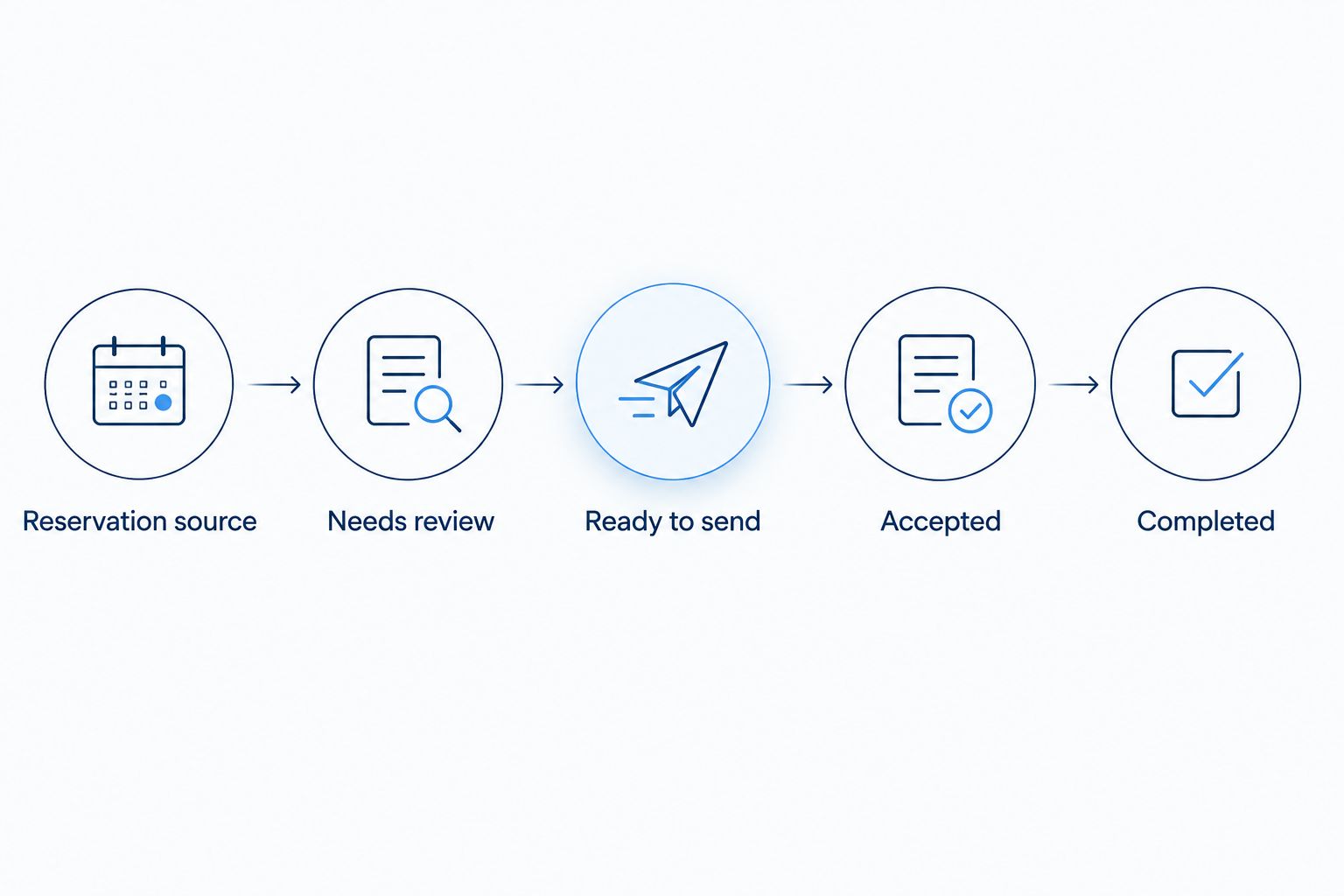
For your 2026 workflow, track these as separate events: reservation received, cleaning requested, cleaning accepted, and cleaning completed. A successful notification proves only that a message was sent—not that someone accepted the job.
Before you start
- Reservation access: Have authorized access to Booking.com reservations, including the property or unit, reservation identifier, departure date, and reservation status. If another system receives these records, verify which changes it actually receives.
- A request destination: Prepare a shared spreadsheet or task board and agree with the cleaning team on how requests arrive. Confirm who monitors replies and who handles a request that remains unaccepted.
- The scheduling gotcha: Checkout alone does not define the cleaning window. You also need the permitted access time, next guest’s arrival deadline when applicable, and the property’s local time zone. Do not treat a blocked calendar date as proof of a guest stay.
Keep a short 2026 setup note identifying the reservation source, request destination, and person responsible for exceptions. This makes the workflow understandable when someone else covers your properties.
Choose your reservation handoff
Use the simplest handoff that you can inspect and maintain. These are workflow choices, not claims that a particular account includes an integration.
| Handoff | Best for | Advantage | Limitation |
|---|---|---|---|
| Reviewed reservation handoff | Hosts who personally review bookings | You check the cleaning window before sending | Someone must process each new or changed reservation |
| Verified connected handoff | Property managers whose existing system exposes reservation changes | Supported events can populate the request record | You must verify event coverage, field mapping, and failed deliveries |
Choose a reviewed handoff unless your connected system demonstrably handles new reservations, modifications, and cancellations. An automated new-booking message alone does not cover the full turnover workflow.
Neither approach replaces cleaner acceptance. Both need an exception list for incomplete records, changed access instructions, and requests awaiting a reply.
Reservation source and event rules
Establish what starts a request
- Identify your reservation source. Use the reservation record you manage directly or an existing connected system that receives Booking.com reservations. Avoid creating competing request sources for the same property.
- Define New reservation as a new request candidate, Changed reservation as an update candidate, and Canceled reservation as a review candidate. These are labels for your workflow, not Booking.com menu names.
- Choose one person to review incomplete records. Put records without a reliable unit or departure date into Needs review, rather than sending them to the cleaner.
- For a connected handoff, inspect a sample event before enabling dispatch. Check that its reservation identifier, unit, departure date, and status match the source reservation.
- Record what the connection does not send. If arrival deadlines or access instructions live elsewhere, assign a specific person to add them before dispatch.
Expected result: Every incoming record has an identifiable reservation, an event type, and an owner when something is incomplete.
Do not build the trigger around a message subject alone. A subject can describe a reservation change without containing the updated cleaning window. Use the reservation details as the scheduling reference, and retain a way to find the original record.
Turnover request record
Create the fields that prevent ambiguous assignments
The bold labels below are fields you create in your spreadsheet or task board. They are not Booking.com interface labels.
- Create Property, Unit, Reservation ID, and Request key. Build the request key from the property, unit, and reservation identifier so separate units do not collide.
- Add Checkout, Access from, and Ready by. Include the date, local time, and time zone for both scheduling boundaries. Do not assume the next arrival uses your usual check-in time.
- Add Cleaning scope, Linen instructions, Restocking instructions, and Access instructions. Reference an approved property checklist rather than rewriting the full scope for every stay.
- Add Reservation status, Request status, Assigned cleaner, Last updated, and Acknowledged at. Keep reservation status separate from cleaning progress.
- Establish request statuses such as Needs review, Ready to send, Sent, Accepted, Completed, and Canceled. Give each status a clear meaning and an owner.
Expected result: One request record describes one reservation’s departure clean, with enough information to assign it without another round of basic questions.
Require 2 scheduling timestamps: Access from and Ready by. If either is unknown, leave the request in review rather than filling it with an assumed time.
For a reusable task scope, adapt the Airbnb turnover cleaning checklist to your Booking.com property. The booking channel changes; the property-specific cleaning instructions still need to stay consistent.
Dispatch and acceptance rules
Send a request without implying coverage
- Agree on the destination with the cleaning team. Use the channel they actually monitor; do not assume they receive messages from your reservation software.
- Prepare a request template containing Request key, Property, Unit, Access from, Ready by, and Cleaning scope. Include the minimum access information needed through the agreed secure channel.
- Send only records marked Ready to send. Change the record to Sent after dispatch succeeds, and record when it was sent.
- Ask the recipient to confirm the property, date, cleaning window, and assignment. Move the request to Accepted only after that acknowledgment arrives.
- Assign a person to follow up on unaccepted requests. Agree on the follow-up point with the cleaner instead of treating a lack of reply as acceptance.
Expected result: You can distinguish a prepared task, a delivered request, and an accepted cleaning assignment at a glance.
For a 2026 dispatch template, use plain language: property and unit first, then the cleaning window, scope changes, and a request for confirmation. Keep guest names, payment details, and unrelated reservation information out of the cleaning message.
Top Shelf Cleaning Co. offers dependable turnover coverage and straightforward quotes tailored to each property. Discuss the request process by phone or text; do not assume a software connection, automatic acceptance, or a particular completion window.
Validation and change handling
Test the workflow before depending on it
- Prepare 3 test records: a new reservation, a changed departure, and a cancellation. Use clearly marked examples rather than creating unnecessary live bookings.
- Process the new-reservation record. Confirm it creates 1 request record with the correct unit and cleaning window, then verify the dispatch and acceptance stages separately.
- Process the changed-departure record using the same request key. Confirm it updates the existing request instead of adding a second cleaning assignment.
- Process the cancellation. Confirm it enters review and alerts the person responsible for the existing cleaning request.
- Record the outcome of each test and resolve failures before enabling unattended dispatch. Repeat the tests after changing the connection or field mapping.
Expected result: Each reservation event reaches the right request without creating a duplicate, silently changing an accepted assignment, or leaving a canceled stay on the active schedule.
Keep the 2026 test record with your property instructions. It should identify which events passed, which require manual review, and who receives failure alerts.
A test is not complete when a row appears. Check the recipient’s view, the actual message content, and the return acknowledgment. Those are separate parts of the handoff.
Update cleaning requests when reservations change
A changed reservation needs a different rule from a new reservation. Match the existing Request key, compare the scheduling fields, and decide whether the change affects the cleaning assignment.
- Departure changed: Recalculate the proposed cleaning window and notify the assigned cleaner. Return the assignment to a reconfirmation stage until the new window is accepted.
- Next arrival changed: Update Ready by and flag any reduced cleaning window for review. Do not silently shorten an accepted assignment.
- Reservation canceled: Review the cleaning request before canceling it. The property might still need a separate clean for reasons outside that reservation.
- Non-scheduling detail changed: Update the record without dispatching another full request unless the change affects the cleaner’s work.
A reservation modification is not permission to overwrite an accepted cleaning window without acknowledgment. Preserve the previous window in your notes so everyone can see what changed.
For adjacent stays, check the departure clean against the next arrival. Keep the request attached to the departing reservation while using the next arrival to establish the completion deadline.
Troubleshooting
Duplicate cleaning requests appear
Check whether both a reservation notification and a connected event create requests. Choose one creation source, then make updates look up the existing Request key before adding a record. Keep a single active assignment while reviewing duplicates.
The clean is scheduled on the wrong date
Compare the source departure with Checkout, Access from, and Ready by. Check the property’s time zone and whether an incoming date was treated as midnight in another zone. Correct the mapping, then review affected requests.
A reservation change never reaches the cleaner
Inspect whether the source sends modification events and whether your workflow processes them. If either part is absent, assign a manual review of changed reservations. Resend the corrected window explicitly and obtain acknowledgment.
A request shows sent but nobody accepted
Treat Sent as delivery status only. Contact the agreed recipient, check the destination, and leave the assignment unconfirmed until someone accepts it. Follow the escalation process you agreed before setup.
A cancellation leaves cleaning on the schedule
Match the canceled reservation to its request key and notify the assigned cleaner. Confirm whether cleaning is still needed, then record the decision. Deleting the reservation record alone does not communicate a canceled assignment.
Customize your workflow
Once the basic handoff works, add property-specific instructions rather than more automatic messages. Separate the standard turnover scope from occasional deep-cleaning tasks so extra work receives its own review and acknowledgment.
For multiple units, group unaccepted requests and schedule changes into a shared exception view. Keep the underlying request records separate so one unit’s acceptance cannot hide another unit’s unresolved assignment.
During your 2026 workflow review, inspect unresolved requests, duplicate keys, and changed windows. Use those specific failures to improve the process; adding another notification does not fix an unclear owner.
FAQ
How do I create a Booking.com turnover cleaning request?
Create a request from the reservation’s property, unit, departure, and cleaning window, then send it through the cleaner’s agreed channel. Track acceptance separately from message delivery.
Does a Booking.com reservation automatically confirm a cleaner?
No. A reservation records a stay, while cleaner confirmation requires a separate acknowledgment of the assignment and cleaning window.
Can I automate requests without a connected reservation system?
Use a reviewed handoff when you do not have a verified connection. Enter the reservation into your request record, check the cleaning window, and dispatch it through the agreed channel.
Is calendar synchronization enough to schedule turnover cleaning?
Calendar synchronization alone does not establish cleaning scope, access instructions, or cleaner acceptance. Verify what the calendar entries represent before using them to create requests.
What happens when a guest changes the checkout date?
Update the existing request and ask the assigned cleaner to reconfirm the revised window. Do not create a second assignment for the same reservation.
What information should I send to the cleaning team?
Send the property, unit, request reference, access window, completion deadline, and agreed cleaning scope. Share access details through the agreed secure channel and omit unrelated guest information.
Can Top Shelf Cleaning Co. help with Booking.com turnovers?
Top Shelf Cleaning Co. provides vacation-rental turnover cleaning in St. Petersburg and Pinellas County. Contact the local team by phone or text to discuss your property, cleaning scope, and request process.
One last thing
Test a changed departure before trusting a new-booking trigger. Creating the first request is only part of the job; keeping an accepted assignment accurate is the part your guests depend on.
Request a free quote by phone or text, and describe your property, turnover scope, and how you want cleaning requests confirmed.