
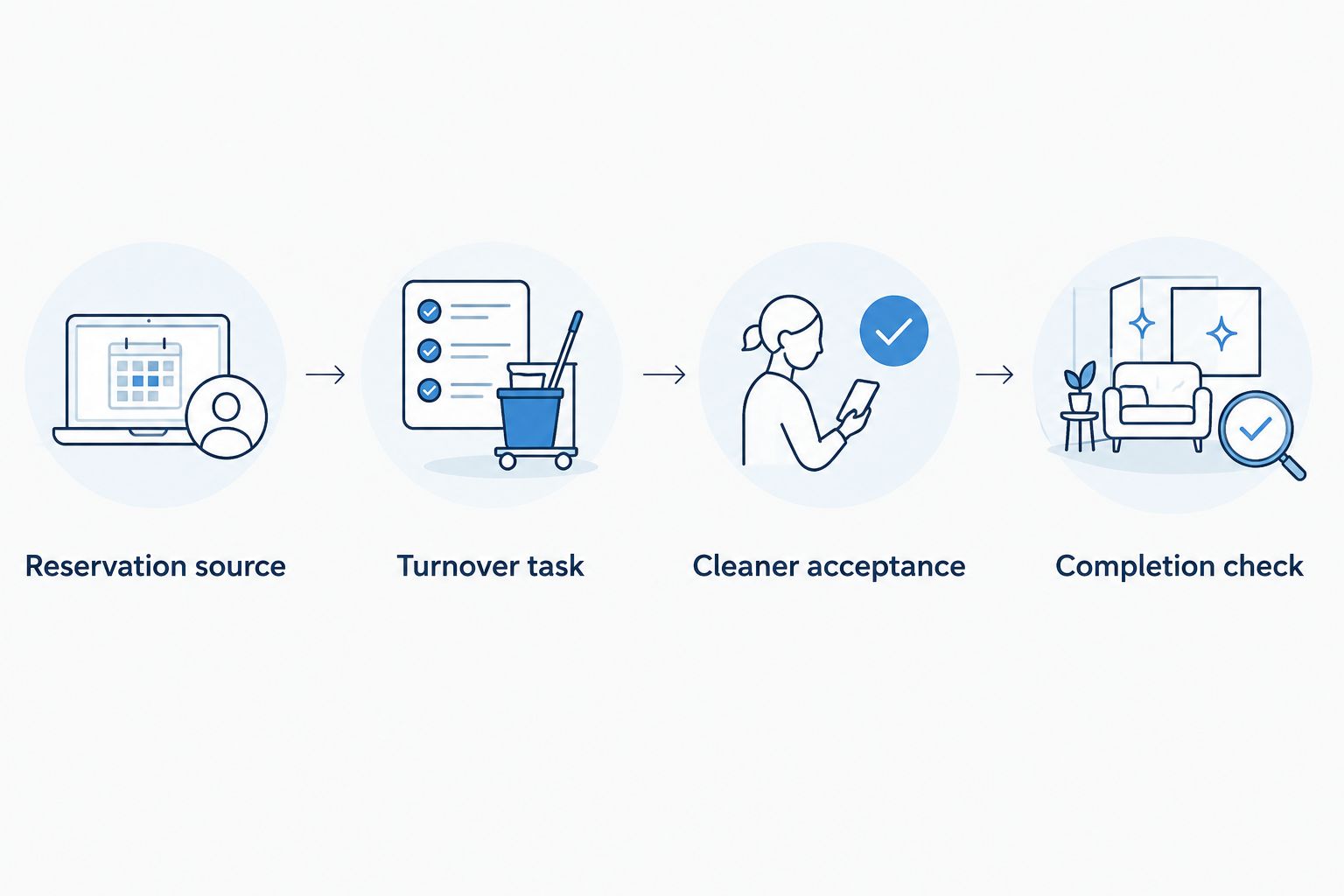
Instead of manually messaging a cleaner after every Airbnb departure, set up automatic cleaning after Airbnb checkout by turning each reservation’s scheduled departure into a turnover task. Route that task to your cleaning team, require acceptance, and update it whenever the reservation changes—without treating a calendar entry as proof that the guest has left.
- Automatic cleaning after Airbnb checkout needs reservation-based scheduling, cleaner acceptance, and a separate completion check.
- Tampatopshelf suits St. Petersburg hosts who want local vacation-rental cleaning coordination by phone or text.
- Schedule from confirmed reservations; do not treat every blocked calendar date as a guest departure.
- Test cancellations, date changes, and same-day turnovers before relying on the workflow.
Why this matters
A scheduled cleaning is not an accepted cleaning assignment. Your workflow needs to distinguish the reservation, the cleaner’s commitment, and the finished turnover. Otherwise, a task can sit on a calendar while everyone assumes someone else owns it.
Tampatopshelf provides vacation-rental cleaning in St. Petersburg and Pinellas County, with a local team reachable by phone or text. Tampatopshelf is best for local vacation-rental hosts who want a cleaning team they can reach directly. Start by agreeing on the handoff with Tampatopshelf, then configure your scheduling system around that agreement.
For your 2026 setup, keep the objective narrow: create the right assignment, get it accepted, and flag anything that changes. Automatic scheduling should remove repeated data entry, not remove responsibility for checking exceptions.
Before you start
- Reservation access: Have permission to view the property’s Airbnb calendar and connect its reservation information to your chosen scheduling system. Confirm whether that system uses a calendar feed or a direct reservation connection.
- An agreed cleaning handoff: Establish who receives assignments, how that person accepts them, where property instructions live, and who handles unanswered requests. Confirm the communication method with your cleaner before enabling notifications.
- The non-obvious gotcha: A blocked calendar period is not necessarily a reservation, and a scheduled checkout is not an actual departure signal. Confirm what your connection supplies before letting calendar events create cleaning assignments.
A cleaner also needs the property address, approved access instructions, cleaning scope, and the next arrival deadline. Keep access credentials in a restricted location rather than a widely shared calendar description.
Choose your reservation connection
There are two connection approaches to evaluate. Choose based on the information your scheduling system actually receives—not the integration’s name.
| Connection approach | Best for | Advantage | Limitation to check |
|---|---|---|---|
| Calendar-feed connection | Hosts whose scheduling system can identify reservation departures from imported events | Uses calendar information to build a departure-based schedule | Feed contents and refresh behavior vary; verify reservation identity, changes, and blocked dates |
| Direct reservation connection | Hosts whose systems support a compatible booking integration | Can support more detailed reservation-driven rules when those fields are supplied | Compatibility and available fields depend on the connected systems |
Use the simplest connection that passes your change and cancellation tests. A more detailed connection is not useful if it creates duplicate assignments or leaves an old checkout date active.
Neither approach proves the property is vacant. Decide separately whether the cleaner can enter at the scheduled checkout time or must wait for departure confirmation.
Reservation source configuration
The bold labels below are suggested fields and statuses for your own task template, not promised buttons in Airbnb or another application. Use the equivalent controls in your chosen system.
- Connect the reservation source. Follow the scheduling system’s documented connection process using an account authorized for the property. Check that the imported calendar belongs to the correct listing.
- Identify genuine reservations. Inspect a reservation and an owner-blocked period. Establish how the system distinguishes them; if it cannot, add a review step before creating an assignment.
- Map the property. Create a Property field that points to the address and unit identifier. Similar listing names are not a safe substitute for a verified property mapping.
- Map reservation identity. Store the source reservation identifier in a Reservation reference field when the connection provides one. Use it to match later changes to the existing task.
- Set the time zone. Check that checkout and arrival times are interpreted in the property’s local time zone, including daylight-saving changes.
Expected result: A sample reservation appears against the correct property with the correct departure date. An owner block does not silently become a cleaning assignment.
If the connection lacks a stable reservation identifier, agree on a manual reconciliation process. Do not use guest names alone to decide whether two records represent the same stay.
Turnover task configuration
Create your 2026 turnover template before applying it to live reservations. Keep scheduling details separate from the cleaning checklist so a changed checkout does not erase property instructions.
- Create the departure rule. Generate the assignment from the reservation’s scheduled checkout. Create it early enough for the cleaner to accept the work; do not wait until departure to discover whether coverage exists.
- Define the cleaning window. Add Earliest entry and Ready by fields. The first reflects your agreed access rule; the second reflects the next guest’s arrival deadline.
- Prevent duplicates. Keep 1 active task per reservation as the default rule. A date change should update that task rather than create another independent assignment.
- Attach the scope. Include bedrooms, bathrooms, laundry arrangements, restocking responsibilities, and property-specific instructions. Record what is included and what needs separate approval.
- Separate cleaning types. Identify a routine turnover separately from a deep clean or move-out clean. Do not assume a departure-based task includes additional work.
Expected result: A reservation produces one identifiable turnover task with an entry condition, a deadline, and a defined scope.
Use the Airbnb turnover cleaning checklist to organize the work attached to that task. The scheduling rule answers when and who; the checklist answers what must be completed.
Cleaner acceptance and completion configuration
Tampatopshelf offers local vacation-rental turnover cleaning, but your scheduling agreement still needs to define how assignments reach the team and how acceptance is recorded. Confirm the handoff before treating any software notification as booked coverage.
- Choose the assignment recipient. Send requests to the agreed coordinator rather than an unmonitored inbox. Include the property, departure date, cleaning window, and relevant access restrictions.
- Require an acceptance status. Create Awaiting acceptance, Accepted, and Needs attention statuses, or equivalent states. Sending a message must not automatically mark a task accepted.
- Set an escalation deadline. Agree on when an unanswered assignment needs a phone call or text. Base that deadline on the cleaning window and the team’s actual arrangements, not an arbitrary software default.
- Define completion evidence. Agree on a completion message, checklist submission, or property photos where appropriate. Keep Cleaning complete separate from any host inspection or guest-readiness approval.
- Assign an exception owner. Name the person responsible for late departures, access failures, damage reports, and work outside the agreed scope.
Expected result: You can distinguish an unaccepted request from confirmed coverage and distinguish finished cleaning from a property still awaiting review.
Direct communication is a benefit of a local service relationship. The trade-off is that the host and cleaning team must agree on the process; a calendar connection alone does not establish it.
Workflow testing and release
Before enabling the workflow across your 2026 reservations, use a controlled test. Keep test messages clearly identified so nobody mistakes them for a live assignment.
- Test a normal departure. Verify the property, checkout date, entry condition, next arrival deadline, and notification recipient.
- Test a changed reservation. Move the departure date in an approved test environment or use your system’s supported testing method. Confirm the existing task updates without leaving the old assignment active.
- Test a cancellation. Confirm that the task is canceled or flagged for review, and that the cleaner receives the change.
- Test a tight turnover window. Use a same-day departure and arrival scenario. Check that the workflow identifies the deadline and does not assume the cleaner has accepted it.
Use 4 test cases as this setup’s release checklist. Record the result of each in a 2026 test log, including what changed and whether the cleaner-facing assignment matched.
Expected result: Normal bookings, changes, cancellations, and tight turnover windows produce the intended task state and communication. Keep manual oversight until every test passes.
Update the cleaning whenever a reservation changes
The adjacent workflow is just as important as initial scheduling: update the existing turnover whenever a booking changes. A departure-only rule misses the work created by extensions, shortened stays, and cancellations.
Match the incoming change to the reservation reference, then compare the old and new departure dates. Update the cleaning window, preserve the property instructions, and notify the assigned cleaner of the difference.
Require renewed acceptance when a change affects the agreed cleaning slot. An accepted Tuesday assignment is not acceptance of a Wednesday assignment.
Use 2 separate deadlines in your task: earliest entry and ready-by time. A reservation extension can move the first; a new incoming reservation can tighten the second. Review both rather than changing only the task’s calendar date.
For a cancellation, decide whether the cleaning should disappear or remain for host review. A canceled stay does not tell you whether someone entered the property or whether separate cleaning work is still required.
Troubleshooting
Duplicate cleaning tasks appear
Check whether the same listing is connected through multiple sources or whether updates create new tasks. Use the reservation reference to update the existing assignment, then reconcile duplicates with the cleaner before deleting anything already accepted.
A blocked date creates a turnover
The rule is treating all calendar events as guest stays. Restrict creation to identifiable reservations; if the connection cannot distinguish them, require approval before sending assignments.
The cleaning remains on the old checkout date
Inspect the source reservation first, then the imported record and the cleaning task. Confirm that the connection receives changes and that the workflow updates existing tasks. Contact the cleaner directly when the timing affects assigned work.
A notification was sent, but nobody accepted
Check the recipient and delivery channel, then review the acceptance rule. Leave the assignment unconfirmed and follow the agreed escalation process. A delivered email is not a staffing commitment.
The cleaner arrives before the guest leaves
The workflow confused scheduled checkout with permission to enter. Add an explicit entry condition and a contact path for late departures. Do not instruct the cleaner to enter solely because a scheduled notification fired.
Customize your workflow
Once the basic handoff works, add property-specific exceptions rather than more automatic messages. For St. Petersburg and Pinellas County rentals, your instructions can identify where to inspect for tracked-in sand, which outdoor areas belong in the agreed scope, and where supplies are stored.
Keep recurring residential cleaning separate from guest-driven turnovers. A standing residential appointment follows an agreed schedule; a vacation-rental assignment follows a reservation and its changes.
Review your 2026 workflow settings whenever you change cleaning teams, access arrangements, or reservation systems. Give each property its own instructions, but keep acceptance and escalation rules consistent enough that nobody has to guess what a status means.
FAQ
Can I automatically schedule a cleaning after an Airbnb checkout?
Yes, if your scheduling system can use reservation departure information to create a cleaning task. Require cleaner acceptance and handle reservation changes separately; a scheduled task does not prove coverage or guest departure.
Does a calendar connection tell me when the guest has actually left?
A scheduled checkout event does not confirm that the guest has left. Use your agreed departure-confirmation or access process before authorizing entry.
Should I use a calendar feed or a direct reservation connection?
Use the connection that supplies the information your workflow needs and passes your change and cancellation tests. Check reservation identification, blocked-date handling, and task updates before relying on either approach.
What happens to the cleaning if a guest extends their stay?
The existing cleaning assignment should move to the revised departure window and notify the cleaner. Require renewed acceptance when the new timing changes the agreed assignment.
Can automatic scheduling handle same-day turnovers?
Automatic scheduling can identify a same-day turnover window, but it cannot establish cleaner availability by itself. Confirm acceptance, entry conditions, and the next arrival deadline before treating coverage as settled.
Can Tampatopshelf help with vacation-rental cleaning in St. Petersburg?
Tampatopshelf provides vacation-rental cleaning in St. Petersburg and Pinellas County. Contact the local team by phone or text to discuss the property, turnover requirements, and a straightforward quote.
One last thing
The most useful alert is an exception that needs a decision. Prioritize an unaccepted assignment, a changed checkout, or an access problem over another routine booking notification.
Keep a reachable person responsible for those exceptions. For local turnover coverage tailored to your property, request a free quote by phone or text.