
Instead of manually checking reservations throughout the day, set up a same day booking cleaning alert that sends confirmed arrivals to your turnover coordinator, requests cleaner acceptance, and flags unanswered jobs. Filter by the property's local arrival date—not the date the reservation notification reaches you.
- A same day booking cleaning alert should request cleaner acceptance, not just deliver a notification.
- Filter confirmed vacation-rental bookings against the property's local arrival date.
- Tampatopshelf vacation-rental cleaning suits St. Petersburg hosts seeking a local team reachable by phone or text.
- Keep booking alerts, accepted assignments, and property-ready confirmation separate.
Why this matters
An urgent booking creates a scheduling decision, not proof that someone can clean the property. Your workflow needs to distinguish a delivered message from an accepted turnover and a finished clean.
Tampatopshelf provides vacation-rental cleaning in St. Petersburg and Pinellas County. The local team is licensed and insured, and you can reach a real person by phone or text. Tampatopshelf vacation-rental cleaning is best for hosts seeking a local team reachable by phone or text. Agree on how urgent requests will be handled before directing automated messages to any cleaning provider.
For your 2026 operating plan, treat the automation as a dispatcher: it identifies the job, delivers the details, and tracks the response. It does not promise same-day service or tell a guest that the property is ready.
Before you start
- Reservation access: Use an account authorized to receive booking events and read reservation status, arrival date, property identifier, and reservation identifier. Your booking system must expose those details to your chosen automation method.
- Routing materials: Prepare a property-to-coordinator directory, an agreed notification channel, a backup contact, and a property-specific turnover checklist. Confirm recipients agree to receive automated requests.
- The date gotcha: Compare dates in the property's time zone. For St. Petersburg properties, use America/New_York, which accounts for daylight saving changes. A UTC date comparison can classify a late-evening reservation incorrectly.
The bold field names below are names to give your workflow variables and assignment records, not claimed button names in a particular application. Map them to the equivalent fields in your booking and automation systems. Confirm that your chosen connection supports reservation events, date conversion, notifications, and record updates before building the workflow.
Reservation trigger and eligibility filter
Start with a new confirmed reservation, then decide whether it needs immediate attention. Keep booking status separate from cleaning status: a confirmed reservation is not an accepted cleaning assignment.
- Select the reservation event. Configure the connection to start when a new reservation is confirmed. If the source sends all reservation events, add a filter that admits only confirmed reservations. Do not dispatch a job from an inquiry or abandoned booking request.
- Map the identifiers. Save Reservation ID, Property ID, Arrival Date, and Reservation Status. Keep the source event identifier too, when supplied, so you can trace repeated notifications.
- Normalize the dates. Convert the current time to Property Time Zone, then extract Local Today. Interpret Arrival Date using the booking system's documented date format; a date-only arrival field should not be treated as a UTC timestamp.
- Apply the same-day rule. Continue only when Reservation Status is confirmed and Arrival Date equals Local Today. Route other confirmed reservations to ordinary turnover scheduling.
- Check the existing assignment. Search by Reservation ID and Property ID before creating an urgent request. If that reservation already has an accepted assignment, notify its coordinator rather than opening another job.
Expected result: A confirmed arrival for today enters the urgent workflow. A future arrival, inquiry, or duplicate event does not create a second cleaning request.
Use 1 property for the initial setup. That is a recommended rollout scope, not a limit on the workflow; it lets you inspect the routing before adding more properties.
Property routing and alert message
The recipient needs enough information to accept or decline without searching through reservation messages. Use a property directory rather than typing a cleaner's contact details into every automation branch.
- Create the routing record. For each Property ID, store Property Name, Coordinator Contact, Backup Contact, and Checklist Reference. Use an internal property identifier that remains stable when a listing title changes.
- Set the cleaning window. Include Guest Arrival Time and the property's current readiness status. If a previous guest is leaving, include the relevant checkout details. Flag unresolved timing instead of guessing that the property is empty.
- Build the request. Include the property identifier, arrival deadline, requested turnover scope, reservation reference, and a clear request to accept or decline. Keep door codes and unnecessary guest information out of general notification channels.
- Record delivery separately. Save Alert Sent At after the notification action succeeds. Keep Assignment Status as pending until a person explicitly accepts responsibility.
Expected result: The correct coordinator receives a property-specific request, while the assignment remains visibly unconfirmed.
Use this message structure as a template, not as a statement about any provider's procedures:
Same-day turnover request. Property: mapped property name. Guest arrival: mapped local arrival time. Scope: agreed turnover checklist. Please accept or decline and confirm the planned cleaning window. Access details are shared through the agreed secure channel.
Keep the cleaning scope consistent with your Airbnb turnover cleaning checklist. An urgent alert should change the scheduling priority, not silently change which tasks count as complete.
Acceptance, escalation, and readiness records
An alert is not a confirmed cleaning appointment. Build an explicit acceptance step, then keep completion separate from acceptance. This prevents a successful message delivery from being mistaken for a ready property.
- Create the assignment states. Use Pending, Accepted, Declined, and Completed. Define who can change each state and where the coordinator will see the current record.
- Set the response deadline. A 10-minute response window is a starting configuration for an urgent request, not a cleaning-time estimate or a provider response promise. Agree on the actual threshold with the recipient before enabling escalation.
- Route unanswered requests. At the deadline, check the current assignment state again. If it remains pending, notify the backup coordinator. Do not send simultaneous cleaning assignments to multiple providers without someone controlling acceptance.
- Handle acceptance. Save Accepted By and Accepted At, then cancel pending escalation for that request. If a second recipient responds afterward, show that the assignment is already taken.
- Confirm completion independently. Require the agreed turnover checklist and a completion confirmation before changing the property to ready. A cleaner accepting the job does not satisfy this step.
Expected result: Every urgent reservation has a visible owner or an unresolved escalation. Only completed, checked work reaches the ready state.
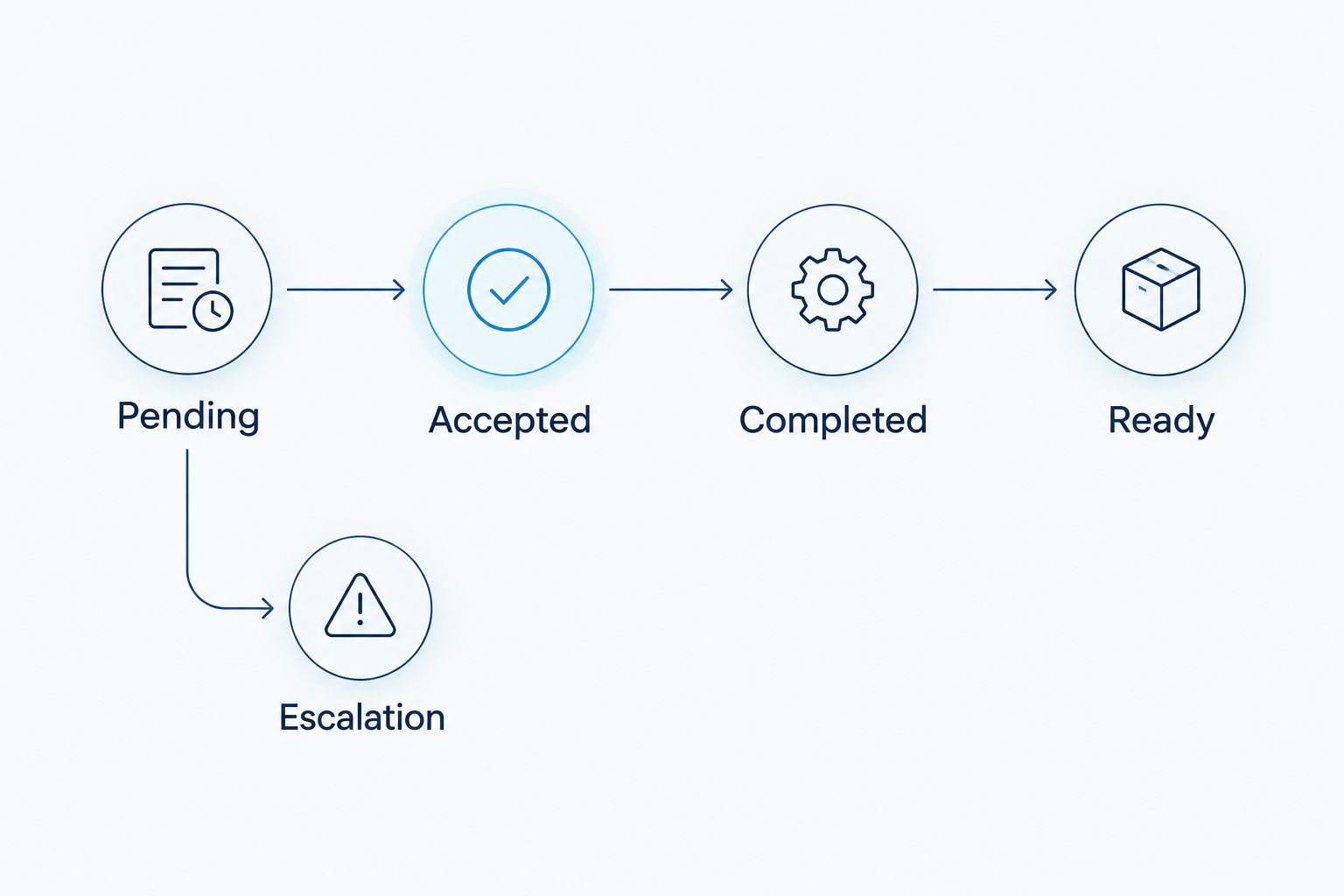
For your 2026 response plan, write down who owns the unresolved job after escalation. A backup notification without an accountable coordinator leaves the same scheduling gap in a different inbox.
Testing and activation
Test the decision logic before it sends live requests. Use a test recipient or clearly marked test messages, and keep guest-facing notifications outside this trial.
- Prepare 2 test bookings. Give one an arrival date matching the property's local today and the other a future arrival date. The first should enter the urgent branch; the second should not.
- Replay the same event. Submit the same reservation identifier again. Confirm that the workflow updates or recognizes the existing assignment instead of creating another request.
- Exercise the response paths. Test acceptance, decline, and no response. Verify that an accepted request stops escalation and a declined request reaches the coordinator.
- Check time handling. Test a late-evening event and confirm that the local date comparison remains correct. For a 2026 test record, use an actual arrival date appropriate to the test rather than copying a stale example.
- Enable live routing. Replace test recipients with the agreed contacts, review the first live assignment, and retain an event log with identifiers, timestamps, delivery outcomes, and status changes.
Expected result: You can explain why each test entered or skipped the urgent branch, identify its recipient, and see whether the assignment was accepted.
Do not activate automatic guest-ready messages simply because the alert tests pass. Readiness depends on the completion checks, not the booking trigger.
Alert the coordinator when a booking changes
A second workflow should handle changes to an existing reservation. Changing the arrival date or time can invalidate the original turnover plan even though the reservation identifier stays the same.
Use the reservation-update event if your connection provides it. Retrieve the existing assignment and compare the new arrival details with the details used when that assignment was accepted. Send the coordinator a change notice only when a relevant field changes.
| Workflow | Best for | Benefit | Limitation |
|---|---|---|---|
| New-booking alert | Newly confirmed same-day arrivals | Opens an urgent assignment request | Does not address later schedule changes |
| Booking-change alert | Existing reservations with revised arrival details | Flags a cleaning plan that needs review | Requires stored details to identify meaningful changes |
For a changed reservation, mark the assignment as needing review rather than silently replacing an accepted cleaning window. For a cancellation, notify the coordinator and stop pending escalation; confirm any changes to scheduled work directly with the provider.
Keep both workflows in your 2026 maintenance checklist. A working new-booking alert does not prove that updates and cancellations are handled correctly.
Troubleshooting
The same reservation sends repeated alerts
Check whether the booking source retries events or emits multiple updates. Match on Reservation ID and Property ID, and store the processed event identifier when available. Record the assignment before sending the notification so a repeated event can find it.
Today's booking is treated as tomorrow's
Inspect the raw arrival value, its format, and Property Time Zone. Compare local calendar dates after the correct conversion. Do not add a fixed hour offset; daylight saving changes make that approach unreliable.
The request reaches the wrong cleaner
Review the routing record against Property ID, not the listing's display name. If no routing record exists, stop dispatch and notify the coordinator rather than using a default recipient who has not agreed to cover that property.
Escalation fires after someone accepts
Check the assignment state immediately before sending the escalation message. Also verify that the acceptance response updates the same record the timer reads, rather than a separate spreadsheet row or message thread.
A booking is confirmed but nobody accepted the turnover
Keep the assignment visibly pending and contact the coordinator through the agreed channel. Do not label it scheduled or ready. Human acceptance is the gate between a request and an assigned job.
Customize your workflow
Expand by property only after the initial routing works. Add each property's checklist, access-sharing procedure, and backup contact; avoid treating every rental as an identical turnover.
Tampatopshelf offers vacation-rental cleaning with straightforward quotes tailored to each property. The useful fit is local coordination by phone or text; the boundary is equally important: this workflow does not establish a software integration, automatic acceptance, or a guaranteed urgent response from the cleaning team.
Review your 2026 property directory whenever responsibilities change. Remove outdated recipients and retest the affected route before relying on it for another same-day arrival.
FAQ
What's the best way to send a same day booking cleaning alert?
Trigger the alert from a confirmed reservation, compare its arrival date with the property's local date, and route it to an agreed coordinator. Require acceptance before treating the cleaning as assigned.
Can I use this workflow for Airbnb turnovers?
Yes, when your reservation system or an authorized connection supplies the required booking events and fields. Confirm the connection's supported events before building the workflow.
Does sending an alert confirm my cleaner will come?
No. A delivered alert confirms only that the notification action succeeded; an explicit acceptance confirms who owns the cleaning assignment.
What time zone should St. Petersburg rental hosts use?
Use America/New_York for St. Petersburg properties. Compare the arrival date against the property's local calendar date rather than an unconverted UTC timestamp.
What should happen when nobody accepts the request?
Escalate the pending request to the agreed backup coordinator. Keep the assignment unresolved until someone accepts it, and do not tell the guest that the property is ready.
Should I include door codes in the cleaning alert?
Keep door codes out of general notification messages. Share access instructions through the secure method agreed with the assigned cleaning team.
Can Tampatopshelf help with vacation-rental cleaning?
Tampatopshelf provides vacation-rental cleaning for hosts and property managers in St. Petersburg and Pinellas County. Request a free quote by phone or text and agree directly on how urgent turnover requests will be handled.
One last thing
Test the handoff that happens after acceptance, not just the message that starts it. An accepted assignment without a completion check still leaves the host responsible for discovering whether the property is ready. Keep one coordinator accountable through that final check.
Related guides
- Vacation-rental cleaning routine between guests
- Cleaning checklist for property managers with multiple units
- Cleaning tips for sand and salt at beach vacation rentals
Request a free quote by phone or text to discuss your property, turnover checklist, and urgent-request process with the local cleaning team.