
Instead of manually texting every checkout to your cleaner, connect your booking calendar to TurnoverBnB—now called Turno—and use the resulting cleaning projects to coordinate each turnover. Your TurnoverBnB cleaning schedule needs both a working calendar connection and a cleaner who has confirmed the job; an imported reservation alone is not confirmed coverage.
- Build your TurnoverBnB cleaning schedule around checkout dates, confirmed assignments, and the next guest’s arrival deadline.
- TurnoverBnB now operates as Turno; use the current platform when following setup instructions.
- Test one property before connecting the rest of your vacation-rental calendars.
- Top Shelf Cleaning Co. suits St. Petersburg hosts seeking local turnover cleaning and direct phone-or-text communication.
Why this matters
A booking calendar tells you when guests stay. A cleaning schedule must also tell you who is coming, when the property becomes accessible, and when it must be ready. Treat those as separate requirements during your 2026 setup.
Top Shelf Cleaning Co. is best for St. Petersburg hosts who want local vacation-rental cleaning with a real person reachable by phone or text. Discuss the scheduling handoff with Top Shelf Cleaning Co. before assuming a software invitation replaces your existing booking arrangement.
The team is licensed and insured and serves St. Petersburg and Pinellas County. Confirm how reservations, changed departures, access instructions, and cleaning confirmations will move between you and the cleaning team.
Before you start
- Account access: Have access to your Turno host account and permission to export the reservation calendar from your booking platform or property-management system. Choose 1 property for the initial setup.
- Property instructions: Gather checkout and check-in times, the cleaning scope, linen arrangements, access instructions, and the contact responsible for schedule changes. Confirm how your cleaner will receive and accept work.
- The gotcha: An iCalendar feed is not a live dispatch system. Calendar subscriptions refresh periodically, and a blocked date is not necessarily a guest checkout. Plan a direct confirmation process for urgent changes before relying on imported events.
Keep calendar-feed links private. They grant access to calendar information, so share them only with services and people who need that access.
Booking source and property connection
Start with the original reservation source, not a calendar that already combines several imported feeds. This makes it easier to identify where a duplicate or incorrect date originated.
Connect the reservation calendar
- Open the property in your booking platform or property-management system. Find its calendar export settings and copy the subscription feed, commonly described as an iCal or iCalendar link. Copy the feed itself, not the address of the calendar page in your browser.
- Sign in to Turno and open the matching property. Use its calendar connection settings to add the exported feed. Match the property by its address or unit identifier, not just a nickname such as Beach Condo.
- Give the connection a recognizable source name where the setup allows it. Use the same naming convention across properties so you can distinguish a direct reservation feed from an imported calendar.
- Save the connection and inspect a real upcoming reservation. Compare the arrival and departure dates with the original booking before reviewing any cleaning project generated from it.
Expected result: The connected calendar belongs to the correct rental, and an upcoming reservation shows the same dates as its source.
Do not add every feed you can find. If a property-management system already contains your reservations, importing those same bookings separately creates another place to check for duplication. Choose a clear source for each reservation stream.
Check the calendar’s meaning
A calendar event can represent a reservation, an owner stay, maintenance, or an unavailable date. Inspect how your connected feed distinguishes those events before accepting its cleaning schedule as correct.
For your 2026 setup, compare one actual guest stay with one non-guest block if both exist. Determine whether each should produce a cleaning task. An owner stay might need cleaning; a maintenance hold might not. Make that decision from the property’s needs, not the event’s mere presence.
Cleaning window and assignment settings
A checkout date answers only part of the scheduling question. Your cleaner also needs the permitted entry time and the deadline imposed by the next arrival.
Configure the turnover instructions
- Review the cleaning project associated with your sample reservation. Confirm that its service date follows the intended departure, rather than the guest’s arrival.
- Check the property’s time zone and the displayed cleaning window. For a St. Petersburg rental, use the property’s local time consistently in both the scheduling system and your written instructions.
- Record the checkout time and next check-in deadline in the property instructions or project details. Distinguish the earliest permitted entry from the required finish time.
- Add the cleaning scope: rooms, bed setup, laundry responsibilities, replenishment instructions, and any agreed exterior areas. Separate routine turnover work from deep-cleaning requests.
- Agree on how your cleaner receives and confirms assignments. If you intend to invite an existing cleaner through Turno, confirm that arrangement with the cleaner first.
Expected result: A cleaner can identify the correct property, understand the work, and confirm the permitted service window without reconstructing it from guest messages.
Keep access information separate from public-facing notes. Do not place a door code in a calendar title that is shared more widely than the cleaning team.
Choose the right confirmation method
These approaches serve different needs. Neither removes the need to confirm who is responsible for the turnover.
| Scheduling approach | Best for | Main benefit | Main limitation |
|---|---|---|---|
| Calendar-based cleaning projects | Hosts managing repeat turnovers | Reduces repeated entry of reservation dates | Requires checks for feed delays, changed bookings, and assignment status |
| Direct phone-or-text coordination | Urgent changes and unusual cleaning requirements | Lets you explain the exception and request acknowledgment | Requires you to record the agreed change in the schedule |
Use calendar-based scheduling for the routine and direct communication for exceptions. Do not assume Top Shelf Cleaning Co. has received or accepted a Turno project unless that workflow has been agreed and the job confirmed.
Schedule validation and handoff
Do not connect the rest of your portfolio just because the first reservation appears. Test the handoff from reservation to confirmed cleaning.
Validate the complete workflow
- Reservation check: Compare the source booking with the imported event. Verify the property, arrival date, departure date, and event type.
- Assignment check: Inspect the associated cleaning project. Verify its date, cleaning window, instructions, and cleaner confirmation through your agreed process.
- Completion check: Agree on how the cleaner reports completion, missing supplies, access problems, or damage. Identify the person who decides whether the property is ready for guests.
Expected result: You can trace one real reservation from its source to a confirmed cleaning assignment and a defined completion handoff.
For your first 2026 turnover using the connection, keep the original booking and cleaning project side by side during the review. This is a validation step, not a reason to maintain two competing schedules indefinitely.
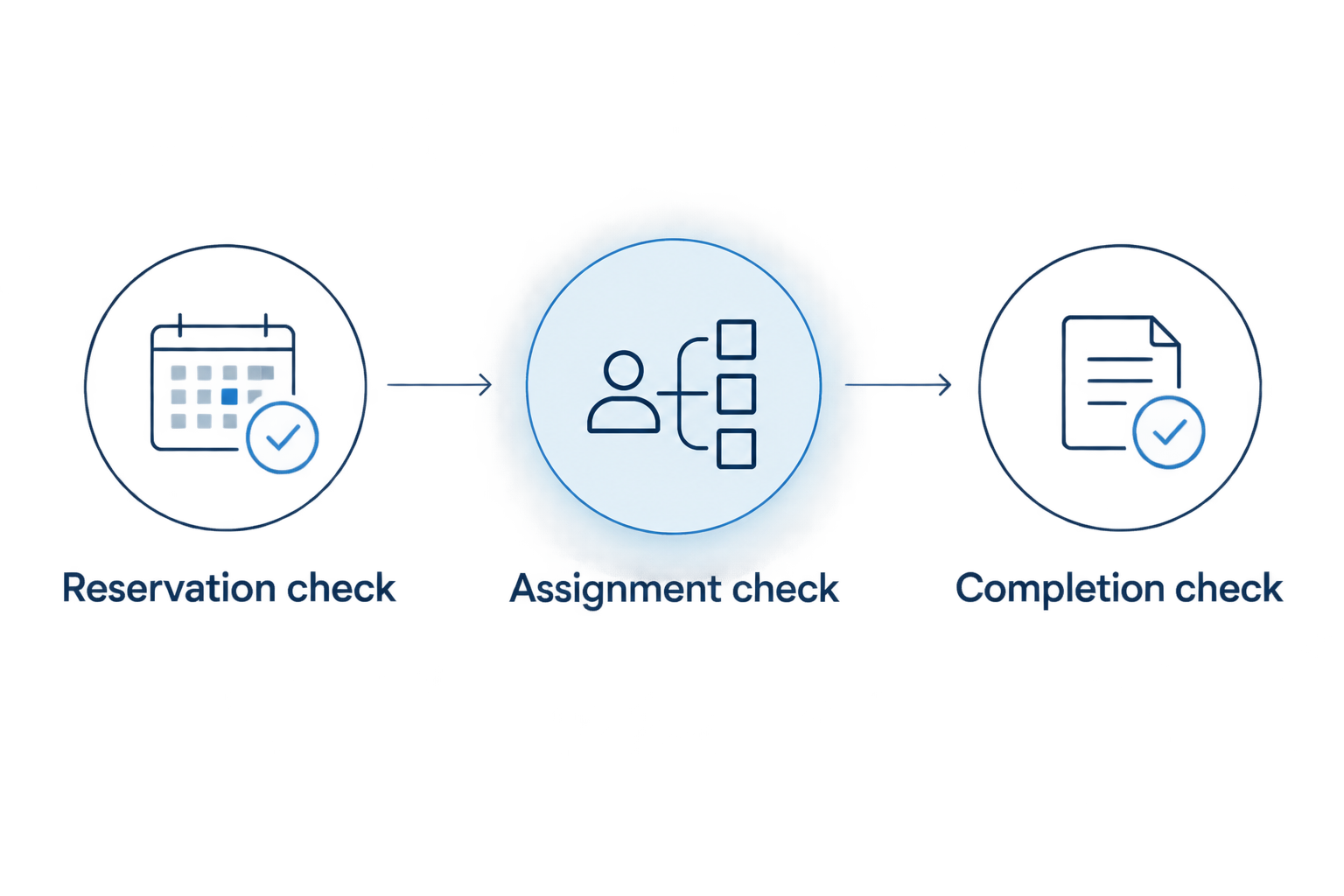
After the checks pass, document who owns schedule corrections. One person should be accountable for resolving discrepancies, even when several people can view the calendar.
Update the cleaning plan when a reservation changes
A new reservation is not the only event that affects cleaning. An extension, cancellation, late checkout, or earlier arrival can change an existing assignment without creating a straightforward new turnover.
Use this second workflow whenever a booking changes:
- Update or verify the reservation in its original booking system. Avoid editing only the cleaning project while leaving the reservation source incorrect.
- Check the connected calendar and the related cleaning project after the change appears. Inspect both the old service date and the new one.
- Confirm whether the cleaning should move, remain scheduled, or be removed. A canceled guest stay does not automatically mean the property needs no work.
- Contact the cleaner directly when the change affects an agreed assignment. Request acknowledgment of the revised date or cleaning window.
- Record the final agreement in the schedule your team actually follows. Remove or correct the outdated instruction so it cannot compete with the new one.
Expected result: The reservation, cleaning project, and cleaner’s confirmed plan agree after the change.
For a same-day change in 2026, do not wait for a calendar refresh to communicate the problem. Give the cleaner the property identifier, revised departure time, next arrival deadline, and the specific confirmation you need.
Troubleshooting your TurnoverBnB cleaning schedule
A reservation is missing
First, check whether the reservation exists in the calendar you exported. Then verify that the correct feed is connected to the correct property and that the connection shows no error.
A newly changed event might not appear immediately in a subscribed calendar. If the cleaning is urgent, arrange it directly and check the imported project later to prevent a duplicate assignment.
The same turnover appears twice
Look for overlapping sources. The reservation might arrive through both a direct booking-platform feed and a property-management calendar that already includes it. Also check whether someone created a manual cleaning project while waiting for the import.
Compare reservation dates and source names before removing anything. Retain the intended assignment and confirm with the cleaner which project or instruction remains valid.
The cleaning falls on the wrong day
Compare the guest’s departure date, the cleaning project’s date, and the property time zone. Check whether an all-day calendar event has been interpreted as a stay rather than a departure instruction.
Correct the source or scheduling rule responsible for the mismatch. Then inspect the next upcoming project to confirm that the fix applies beyond the single job you edited.
The project exists, but coverage is unconfirmed
A visible project does not prove that a cleaner accepted it. Review the assignment and contact the cleaner through the communication method you agreed to use.
If nobody has confirmed the work, treat the turnover as unconfirmed. Do not leave a guest arrival dependent on an unanswered invitation.
A cancellation leaves confusing instructions
Inspect the original booking, the imported calendar event, and the cleaning assignment separately. Determine whether the cleaner has already received or accepted instructions for the canceled stay.
Tell the cleaner explicitly whether to attend, reschedule, or stop work on that assignment. Correcting a calendar does not replace communicating a change to an agreed job.
Customize your workflow
Once one property works, repeat the same checks for a second property before expanding further. Keep property identifiers, entry instructions, linen responsibilities, and completion reporting consistent across the portfolio.
For each rental, distinguish routine turnover work from occasional deep cleaning. A reservation calendar identifies stays; it does not assess whether an oven, interior cabinet, or lanai needs additional attention. Agree on those requests separately.
Ask Top Shelf Cleaning Co. for a property-specific cleaning quote and discuss how the local team should receive your turnover requests. Describe the property, typical guest-change pattern, laundry arrangements, and any condo access requirements.
FAQ
Is TurnoverBnB the same as Turno?
Yes. TurnoverBnB now operates as Turno, so use the current Turno platform when setting up your cleaning schedule. Older instructions can use different navigation labels.
How do I connect my TurnoverBnB cleaning schedule to bookings?
Connect the property's reservation calendar through Turno's calendar connection settings, then verify the related cleaning projects. Check the service date, cleaning window, and cleaner confirmation before relying on the schedule.
Does an imported reservation mean my cleaner is booked?
No. An imported reservation does not establish that a cleaner has accepted the cleaning assignment. Confirm coverage through the process you agreed with the cleaner.
Why is my cleaning calendar not updating immediately?
Subscribed calendar feeds refresh periodically rather than functioning as instant messages. Check the source reservation and connection status, and communicate urgent changes directly to your cleaner.
Can I connect more than one vacation rental?
You can set up calendar connections property by property in Turno. Validate each property's reservation source, cleaning window, and assignment process rather than assuming the first property's settings fit every rental.
What should I do when a guest checks out late?
Contact the cleaner directly and confirm a revised cleaning window against the next guest's arrival deadline. Update the written schedule so the original checkout instruction does not remain in circulation.
Can Top Shelf Cleaning Co. help with local turnover cleaning?
Yes. Top Shelf Cleaning Co. provides vacation-rental turnover cleaning in St. Petersburg and Pinellas County. Request a free quote by phone or text and agree on the scheduling handoff before sending assignments.
One last thing
A blocked calendar date is not a cleaning instruction. Before expanding your 2026 workflow, inspect an owner stay or maintenance block and decide whether it requires service. That check helps prevent both unnecessary projects and overlooked cleanings.
Related guides
- Connect your Airbnb calendar to automatic turnover cleaning scheduling
- Sync Vrbo and Airbnb bookings to one cleaning calendar
- Give cleaners guest-free access with a smart lock
For turnover cleaning in St. Petersburg or Pinellas County, request a free quote by phone or text. Share your property's details and scheduling needs so the cleaning plan fits your space.