
Instead of copying cleaning dates from Buildium into messages every week, connect each property record to a repeatable cleaning request, confirmation, and completion process. Start your 2026 Buildium cleaning schedule integration with a controlled handoff; automate only the steps your account and chosen scheduling system explicitly support.
- A Buildium cleaning schedule integration needs property matching, confirmed appointments, and a clear process for changes.
- Keep recurring residential cleaning separate from checkout-driven vacation-rental turnovers.
- Top Shelf Cleaning Co. suits St. Petersburg property managers who need local cleaning coordination by phone or text.
- Test the handoff before repeating it across properties; a sent request is not a confirmed appointment.
Why this matters
A cleaning date in your property-management records does not establish that a cleaner has accepted the work. Keep requested, confirmed, and completed visits distinct. That distinction gives your manager a clear next action when a date changes or access falls through.
Top Shelf Cleaning Co. provides residential and vacation-rental cleaning in St. Petersburg and Pinellas County. The local team is licensed and insured and reachable by phone or text. It is a fit for managers who want a local cleaning service, not a replacement property-management platform.
This guide describes an operational connection between Buildium records and cleaning appointments. It does not present a native connector, a verified third-party integration, or automatic synchronization. Its advantage is a visible, accountable handoff; its limitation is that someone must maintain that handoff unless you separately configure and verify supported automation.
Before you start
- Account access: Have permission to view the relevant Buildium property records and use the task or work-order process already established in your account. Assign a manager who can approve changes and coordinate with residents or hosts.
- Property materials: Gather unit identifiers, cleaning scope, preferred frequency, access instructions, occupancy restrictions, and the cleaning team's agreed communication method. Keep sensitive access details out of broadly shared messages.
- The scheduling gotcha: A recurring visit and a turnover follow different rules. A weekly appointment repeats by agreement; a turnover depends on actual departure and arrival information. Do not use a fixed repeating date as a substitute for a verified checkout.
Before configuring anything in 2026, confirm the functions enabled in your own Buildium account. The steps below specify what to record and verify rather than inventing button names or assuming every account exposes the same controls.
Choose the cleaning schedule you actually need
Select the workflow by the event that makes cleaning necessary. Do not put every property on the same schedule simply because repeating dates are easier to maintain.
| Workflow | Best for | Strength | Limitation |
|---|---|---|---|
| Fixed recurring cleaning | Occupied homes or agreed common-area visits | Establishes a predictable service pattern | Does not adjust itself around occupancy changes |
| Departure-driven cleaning | Vacation rentals and rental changeovers | Connects the request to the property's next use | Requires current departure information and separate confirmation |
Use fixed recurrence for routine upkeep and departure-driven requests for turnovers. A deep clean or move-out clean needs its own scope, even when the address already has recurring service.
For a mixed portfolio, write the workflow type beside each unit. That prevents a manager from treating a routine maintenance visit as a complete guest-ready reset.
Property and scope configuration
Build the property match before you create repeating appointments. Similar addresses, building names, and unit numbers are easy to confuse when messages lose their original context.
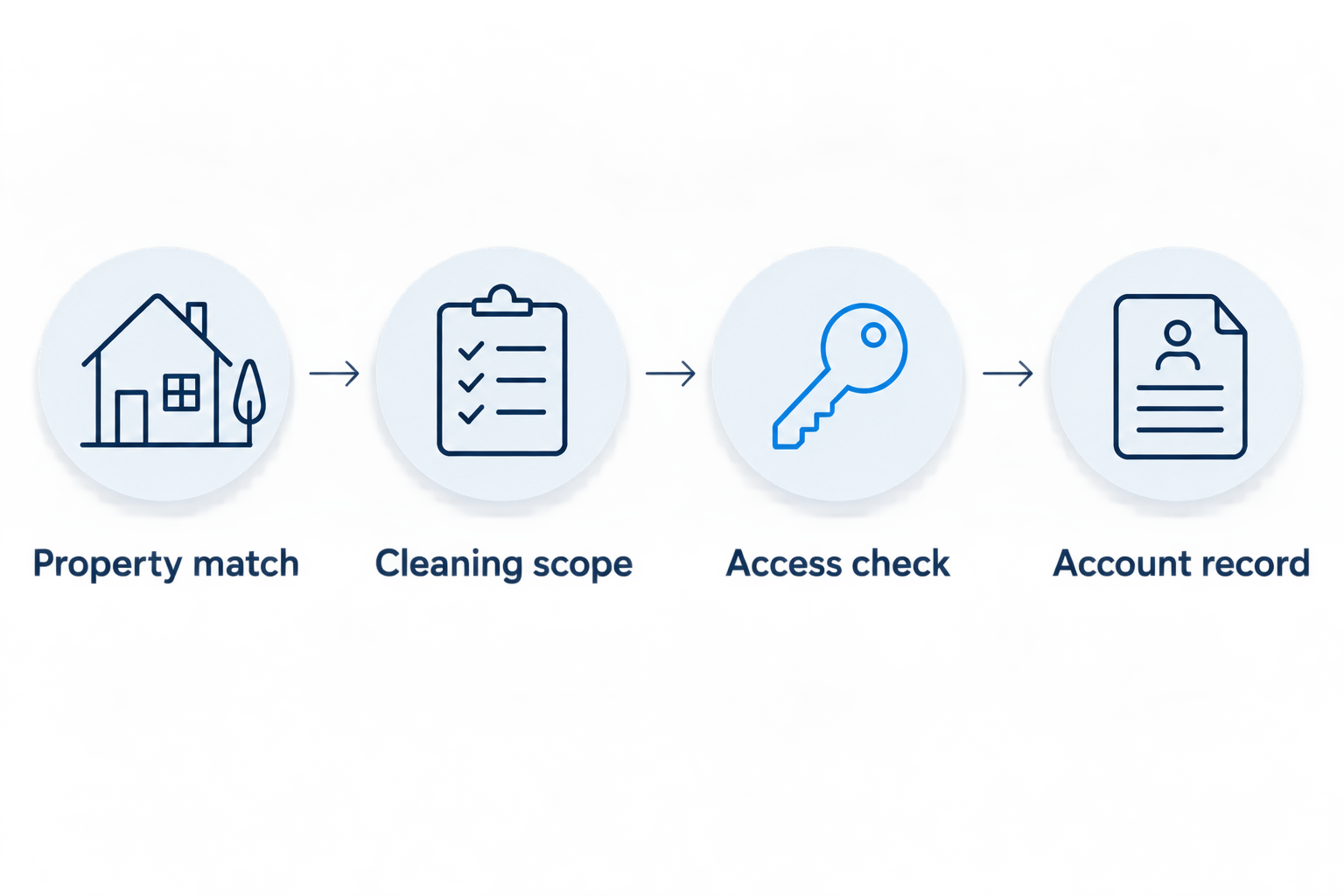
- Property match: Choose 1 property for the pilot. Copy its established property and unit identifier from your Buildium records into the cleaning brief, using the same spelling and unit format throughout.
- Cleaning scope: Write the rooms and tasks requested. Separate routine cleaning from laundry, restocking, interior appliance work, lanai cleaning, and other requested work; confirm what the cleaner accepts rather than assuming inclusion.
- Access check: Record who authorizes entry, how access will be arranged, and whom to contact if entry fails. For occupied homes, coordinate the appointment with the resident through your established process.
- Account record: Place the brief in the existing task or work-order process your manager uses. Keep the property identifier visible wherever the cleaning request is discussed.
Expected result: A manager and cleaner can identify the same unit, understand the requested work, and explain how entry will be arranged without reconstructing a message thread.
Use the same brief structure for every pilot property. Consistency matters more than adding extra fields: an unused field does not help the person standing outside a locked door.
Recurring appointment configuration
Configure the service agreement first, then represent it in your management process. A repeating reminder should reflect an accepted arrangement, not create one without the cleaner's knowledge.
- Agree on the cleaning frequency and preferred appointment window with the cleaning team. Include any resident restrictions, building entry requirements, and the procedure for requesting a change.
- Record the first accepted appointment and the agreed repeat pattern. For example, if you agree to service every 2 weeks, write that interval explicitly rather than using an ambiguous phrase such as twice monthly.
- If your account provides a suitable recurrence function, check its behavior before enabling it. Otherwise, create dated follow-up tasks through your existing process; do not describe those reminders as synchronized appointments.
- Give a named manager responsibility for sending requests and recording acceptance. Keep an appointment unconfirmed until the cleaning team explicitly accepts it.
Expected result: Each planned visit has a property, service scope, appointment window, and responsible manager. Repetition creates the next planning action without implying that a new or changed visit has already been accepted.
For your 2026 setup, document which record controls the appointment: the manager's approved cleaning schedule or another mutually agreed record. Avoid maintaining competing calendars that both appear authoritative.
Cleaning-team handoff configuration
Keep the handoff short enough to read on a phone. It should contain the facts needed to accept the job, not the property's entire management history.
- Send the property identifier, requested date or window, cleaning scope, and any occupancy restrictions through the agreed communication method. Share access details only with the people who need them.
- Ask the cleaning team to confirm the unit, appointment window, and scope. Resolve exceptions before recording the appointment as confirmed.
- Record acceptance in your management process, including who accepted and when. If the cleaner proposes a different window, obtain the necessary resident or host approval before treating it as final.
- Establish a separate completion message. Ask for confirmation that the agreed work is finished and for any access, maintenance, or scope exceptions that need a manager's decision.
Expected result: The manager can distinguish a request waiting for a reply from a confirmed appointment and a completed visit.
For local coordination, Top Shelf Cleaning Co. offers straightforward quotes tailored to the property and dependable turnover coverage. Discuss the scope and scheduling arrangements directly; this workflow does not imply that the team receives Buildium notifications or has access to your account.
Use the quote request page to introduce the property and cleaning needs. Agree on the ongoing phone or text handoff before adding repeating requests.
Test and exception configuration
Test the complete process before expanding it. A reminder appearing on a screen verifies only the reminder, not cleaner acceptance or access.
- Run 3 test cases: a normal appointment, a date change, and a cancellation. Use clearly identified test records or a coordinated pilot so nobody mistakes a test for a live cleaning request.
- For the date-change test, update the management record and notify the cleaner. Check that the previous appointment is no longer treated as active and that the replacement is explicitly accepted.
- For the cancellation test, confirm receipt with the cleaner and stop the relevant follow-up. Check separately whether the next recurring visit should remain in place.
- Review the completed pilot with the responsible manager. Correct unclear scope, duplicate reminders, and missing acknowledgments before adding another property.
Expected result: Every test ends with a single understood outcome, and the manager knows who must act when the normal sequence breaks.
Record the test date in your 2026 operating notes. Repeat the relevant tests when you change scheduling tools, recurrence settings, or the person responsible for coordination.
Request a cleaning whenever departure details change
A departure-driven workflow is the adjacent option for vacation rentals and move-outs. Keep it separate from ordinary recurring residential cleaning because a changed departure changes the cleaning request itself.
Use the reservation or tenancy record your team already treats as authoritative. Do not assume a Buildium record supplies live vacation-rental checkout information unless you have verified that connection in your own setup.
- Check the latest confirmed departure and the next required occupancy window.
- Send a cleaning request containing those times, the property identifier, and the turnover scope.
- Obtain explicit acceptance before recording the cleaning as confirmed.
- When departure or arrival changes, reopen the cleaning arrangement and obtain fresh confirmation.
Best for: Hosts and managers coordinating guest departures or tenant changeovers. The benefit is a request tied to actual occupancy; the drawback is that each exception needs attention.
Keep cleaning completion separate from permission to release the property. A manager still needs to resolve any reported maintenance or access issue before deciding the space is ready for its next use.
Troubleshooting
A request exists, but the cleaner has not accepted
Treat the visit as unconfirmed. Contact the cleaning team through the agreed method, then record the response; creating another identical request does not resolve the missing acceptance.
Two requests describe the same visit
Compare the unit, date, and cleaning scope before canceling anything. Keep a single active request and explicitly identify the duplicate so the cleaner does not interpret its cancellation as canceling the actual appointment.
The cleaner arrives without usable access
Contact the designated property representative rather than circulating additional credentials to a wider group. Resolve resident permission, building entry, parking, and unit entry separately; a working unit key does not solve a locked building entrance.
A changed appointment still appears on the old date
Check both the management record and the cleaning team's acknowledged arrangement. Correct the outdated record, withdraw the old request, and obtain acceptance of the replacement before assuming the change is complete.
The visit is complete, but the requested work is disputed
Compare the completion report with the accepted scope. Clarify the unresolved task directly, then amend the recurring brief if future visits need different work; do not silently expand the standing assignment.
Customize your workflow
After the pilot, expand by property type rather than copying every rule across the portfolio. Keep separate briefs for recurring occupied-home cleaning, vacation-rental turnovers, and deep or move-in/move-out cleaning.
Add a short exception field for the items that affect that property: resident coordination, condo access rules, pets, laundry instructions, or requested exterior areas. Confirm each item with the cleaning team instead of treating a note as acceptance.
For the rest of 2026, keep the operating rule simple: one approved appointment record, one responsible manager, and a clear acknowledgment when anything changes. Add automation only when you can demonstrate that it preserves those controls.
FAQ
Can I connect Buildium directly to my cleaning company?
Agree on a cleaning-request workflow first, then verify any direct software connection separately. This guide describes a managed handoff and does not establish that a native connector exists between Buildium and your cleaner.
What's the simplest Buildium cleaning schedule integration?
Start with a property-specific brief, an agreed repeat pattern, and explicit appointment confirmation. Keep the request, acceptance, and completion visible in your existing management process.
Can I automatically book a cleaner when I create a recurring task?
A recurring task is not proof of an accepted cleaning appointment. Treat it as a planning action unless the cleaner has agreed to the standing arrangement or you have verified a supported booking connection.
Should Airbnb turnovers use the same schedule as recurring house cleaning?
No. Turnovers should follow verified departure and arrival information, while recurring house cleaning follows an agreed repeat pattern. Keep their scopes and change procedures separate.
Do cleaners need a Buildium login to receive cleaning requests?
Not for a handoff handled through an agreed communication method such as phone or text. Share the necessary property and appointment information without granting broader account access.
What should I do when a resident changes the cleaning date?
Notify the cleaning team and obtain acceptance of the replacement appointment. Update the management record and explicitly withdraw the old request so both dates do not remain active.
Can Top Shelf Cleaning Co. help with recurring property cleaning?
Yes. Top Shelf Cleaning Co. provides residential and vacation-rental cleaning in St. Petersburg and Pinellas County. Contact the local team by phone or text to discuss the property, cleaning scope, and scheduling arrangements.
One last thing
Test a cancellation before trusting a repeating schedule. A successful first appointment shows that a request reached someone; a successful cancellation shows that your process also stops work when plans change.
Related guides
- Cleaning for multi-property Airbnb hosts
- Connect Google Calendar to your rental cleaning schedule
- Cleaning checklists for property managers with multiple units
For cleaning built around your St. Petersburg or Pinellas County property, contact the local team by phone or text and request a free quote.